
November 2026 - Cannabis Vape Troubleshooting - stiiizy battery not working
STIIIZY Battery Not Working? How to Identify Common Problems
STIIIZY battery not working? Learn common causes, charging issues, blinking light meanings, and safe troubleshooting tips for your vape device.
By the MedLeaf Editorial Team ·
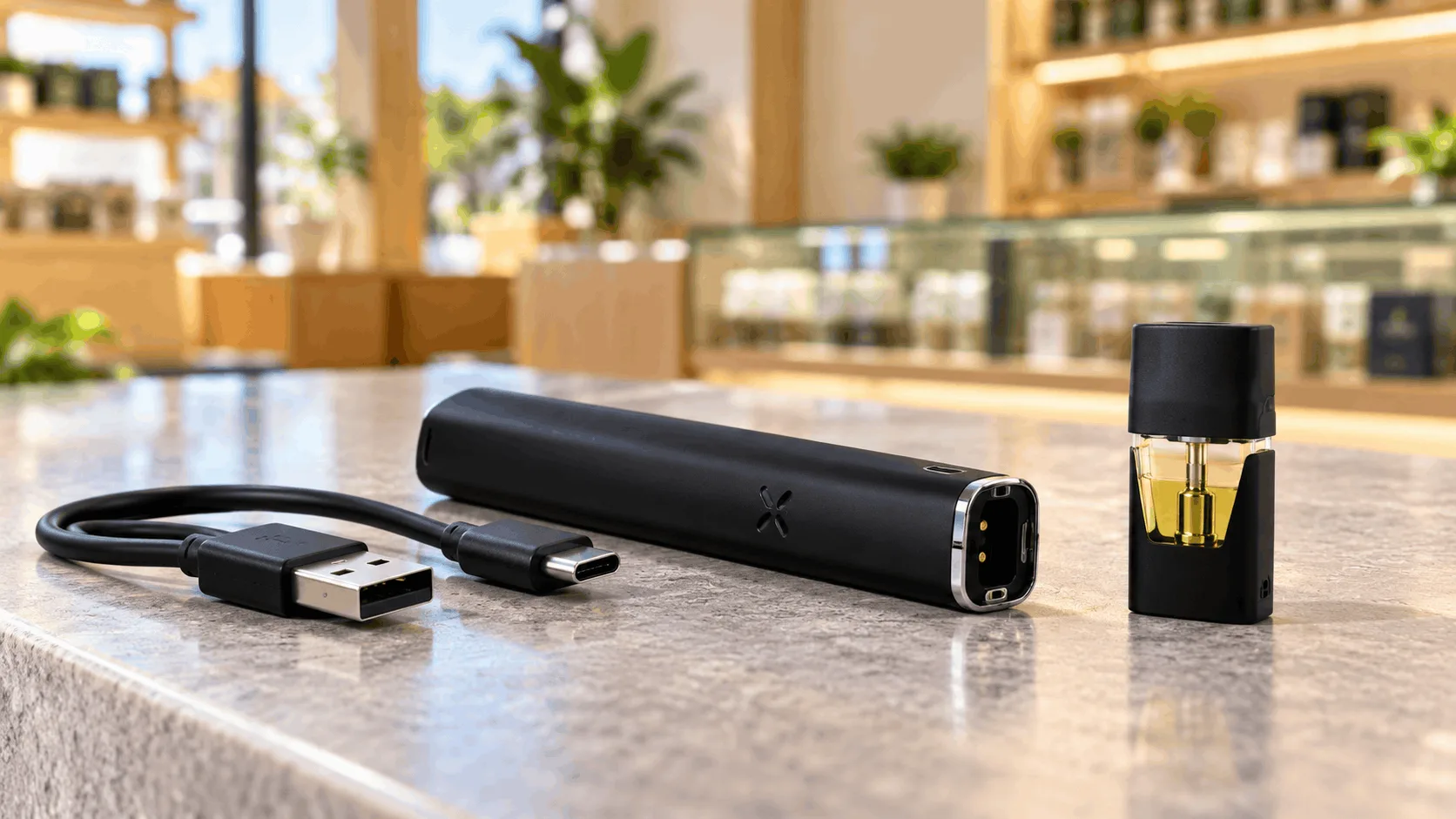
STIIIZY Battery Not Working? How to Identify Common Problems
You've connected your STIIIZY pod, tried to use your device, and nothing happens. Frustrating, right? If your STIIIZY battery not working is the problem you're facing, you're certainly not the only one who's encountered vape device issues.
STIIIZY batteries are designed to work with the brand's proprietary cannabis vape pods, but charging problems, dirty connections, and normal hardware wear can interfere with performance.
The good news? Some common issues are easy to identify without taking the device apart or attempting risky repairs.
This guide explains why a STIIIZY battery may stop working, what different warning signs could mean, and when it's safer to stop using the device.
TL;DR – Quick Guide
- STIIIZY battery not working? Common causes include a depleted battery, charging problems, dirty contacts, or incompatible hardware.
- No indicator light: The battery may be discharged, the charging connection may be faulty, or the device may have an internal problem.
- Blinking light: Flashing indicators can signal a connection issue, low battery, or device fault, depending on the model.
- Charging issues: Damaged cables, blocked charging ports, and battery wear can prevent proper charging.
- Pod connection problems: Debris or poor contact between the pod and battery may interrupt operation.
- Safety first: Stop using batteries that overheat, swell, leak, or show visible damage.
- Product information: The STIIIZY vape review provides additional background on the brand's pod system and device features.
Detailed Breakdown
Why Is My STIIIZY Battery Not Working?
When a STIIIZY battery stops responding, the problem generally involves its power supply, charging components, or connection with the pod.
Common warning signs include:
- No light when the pod is connected or the device is activated
- A blinking indicator light
- Failure to charge
- A loose or inconsistent pod connection
- A battery that loses power unusually quickly
- Excessive heat or visible hardware damage
Not every issue means the battery is permanently broken. However, the symptoms can help determine whether the problem involves charging, compatibility, or a potentially unsafe device.
Common STIIIZY Battery Problems and What They Mean
1. STIIIZY Battery Not Lighting Up
If the battery shows no indicator light, it may have insufficient charge or a hardware problem.
Possible causes include:
- A fully discharged battery
- A faulty charging cable
- A damaged charging port
- Internal battery deterioration
- An electronic malfunction
Check the manufacturer's instructions for the correct charging method and indicator behavior.
If the battery remains completely unresponsive after an appropriate charging attempt, discontinue use and contact the manufacturer or retailer rather than opening the device.
2. STIIIZY Battery Blinking but Not Working
A blinking light can be confusing, especially when the device doesn't appear to function normally.
Depending on the STIIIZY model, flashing lights may indicate:
- Low battery charge
- A connection problem
- A device protection feature
- A charging or electronic fault
Important: Blink patterns aren't necessarily identical across STIIIZY battery models, so avoid assuming that a specific number of flashes always means the same thing.
Refer to the instructions for your exact device before interpreting its warning lights.
3. STIIIZY Battery Not Charging
Charging problems are another common reason for a STIIIZY battery not working.
A damaged charging cable, debris in the charging port, or normal battery wear can prevent the device from charging properly.
For safe troubleshooting:
- Inspect the charging cable and port for visible damage.
- Confirm that the charging equipment matches the manufacturer's specifications.
- Avoid charging the device if the battery or port appears damaged.
- Stop charging immediately if the device becomes unusually hot.
Never attempt to bypass charging protections, modify electrical contacts, or use improvised charging equipment.
4. Dirty or Poor Pod Connections
STIIIZY pods rely on electrical contact with a compatible battery.
Dust, residue, or a poorly seated pod can interfere with the connection.
If the manufacturer permits routine contact cleaning, follow its instructions and ensure the device is disconnected from power first.
Avoid using sharp tools, excessive liquid, or force to adjust the contacts.
For a broader explanation of hardware differences, the guide to vape pods vs. cartridges covers how proprietary pod systems compare with traditional cartridges.
5. Battery Wear or Internal Damage
Rechargeable batteries gradually lose capacity over time.
A STIIIZY battery that drains unusually quickly, charges inconsistently, or stops responding may be approaching the end of its useful life.
Physical damage can also affect battery safety.
If the device is swollen, leaking, unusually hot, or visibly damaged, stop using and charging it immediately. Don't attempt to disassemble or repair its internal battery.
STIIIZY Battery Troubleshooting: Quick Problem Guide
If your STIIIZY battery not working issue persists, use this table to identify possible causes.
Problem | Possible Cause | Recommended Action |
|---|---|---|
No indicator light | Depleted battery or device fault | Check manufacturer-approved charging instructions |
Blinking indicator | Low charge or connection issue | Consult the model-specific user guide |
Won't charge | Cable, port, or battery problem | Inspect for damage and discontinue unsafe charging |
Pod not recognized | Poor connection or incompatibility | Confirm pod and battery compatibility |
Battery drains quickly | Battery deterioration | Contact the manufacturer about replacement |
Device overheats | Battery or electrical fault | Stop using and charging immediately |
This table is a general troubleshooting reference, not a substitute for STIIIZY's model-specific instructions.
How Long Should a STIIIZY Battery Last?
Battery lifespan depends on the model, charging frequency, storage conditions, and normal wear.
Like other rechargeable lithium-ion devices, STIIIZY batteries can gradually lose their ability to hold a charge.
A battery that previously operated normally but now drains much faster may be showing signs of deterioration.
It's also important to distinguish battery lifespan from cartridge lifespan.
If you're unsure whether the issue involves the battery or the cannabis oil product, understanding how long vape carts last can provide useful context about product storage and longevity.
STIIIZY Battery vs. All-in-One Vape: What's the Difference?
STIIIZY's traditional pod system uses a rechargeable battery with replaceable, compatible pods.
All-in-one cannabis vapes combine the oil reservoir, heating components, and battery into a single device.
Here's how they compare:
Feature | STIIIZY Pod System | All-in-One Vape |
|---|---|---|
Battery | Separate compatible device | Integrated |
Oil container | Replaceable pod | Built into device |
Charging | Depends on battery model | Depends on product |
Compatibility | Proprietary pod system | Self-contained |
Replacement | Battery and pod are separate | Usually entire device |
Neither format is immune to battery or hardware problems.
For more information about these designs, explore the all-in-one cannabis vape guide.
When Should You Replace a STIIIZY Battery?
Not every charging or connection issue requires a replacement, but certain warning signs shouldn't be ignored.
Consider contacting the manufacturer or retailer if:
- The battery no longer charges using approved equipment.
- The device repeatedly fails to recognize compatible pods.
- The battery loses charge unusually quickly.
- The charging port is visibly damaged.
- The device has been dropped and no longer functions normally.
Stop using the battery immediately if it swells, leaks, emits unusual odors, overheats, or shows signs of electrical damage.
Do not throw damaged lithium-ion batteries into ordinary household trash. Follow local battery recycling or hazardous-waste disposal requirements.
Where Can You Get Help With STIIIZY Device Questions?
If your STIIIZY battery not working issue remains unresolved, the safest next step is to contact the manufacturer or the retailer where the device was purchased.
Keep the product packaging, purchase information, and device model details available when requesting assistance.
For eligible adults researching cannabis vape products in San Diego, MedLeaf Delivery provides an online catalog with product information and availability.
Customers with questions about an order or a product purchased through the business can contact MedLeaf Delivery for assistance.
Key Takeaways
- Common causes: A STIIIZY battery not working may result from low charge, charging problems, dirty contacts, or hardware deterioration.
- No indicator light: Check the device's approved charging instructions and inspect for visible damage.
- Blinking lights: Indicator meanings vary by model, so consult the correct user guide.
- Charging safety: Avoid damaged cables, improvised charging equipment, and attempts to bypass battery protections.
- Pod compatibility: STIIIZY's proprietary pod system requires compatible STIIIZY hardware.
- Battery lifespan: Rechargeable batteries gradually lose capacity and may eventually require replacement.
- Know when to stop: Overheating, swelling, leaking, or physical damage are reasons to discontinue use immediately.
- Get professional assistance: Persistent problems should be referred to the manufacturer or retailer rather than addressed through internal repairs.
If your STIIIZY battery not working issue continues after basic, manufacturer-approved checks, replacement or professional support may be the safest option.
Frequently Asked Questions (FAQs)
1. Why is my STIIIZY battery not working even after charging?
A STIIIZY battery not working after charging may have a faulty charging connection, degraded battery, or internal electronic problem. The charging cable or port could also be damaged. If the device remains unresponsive after following the manufacturer's instructions, contact the manufacturer or retailer.
2. What does it mean when my STIIIZY battery keeps blinking?
Blinking lights may indicate low battery charge, a connection issue, or a device fault. The exact meaning depends on the STIIIZY battery model and its indicator system. Consult the model-specific instructions rather than relying on a universal blink-code explanation.
3. Can a dirty connection cause a STIIIZY battery to stop working?
Yes, dust or residue around the pod connection can interfere with electrical contact. Cleaning should only be performed according to the manufacturer's instructions with the device disconnected from power. Avoid sharp objects, excessive liquids, or attempts to modify the electrical contacts.
4. How do I know if my STIIIZY battery needs replacing?
A battery may need replacement if it no longer holds a charge, repeatedly fails to recognize compatible pods, or stops responding. Visible swelling, leaking, overheating, or physical damage are more serious warning signs. Stop using damaged devices and contact the manufacturer or retailer for guidance.
5. Can I use a regular 510-thread battery with STIIIZY pods?
Traditional STIIIZY pods use a proprietary connection rather than a standard 510-thread connection. They generally require a compatible STIIIZY battery designed for that pod system. Always confirm compatibility with the manufacturer before connecting any vaping hardware.
More from November 2026
Order weed delivery near you
MedLeaf delivers licensed, lab-tested cannabis across North County San Diego and Southwest Riverside County. Pick your city to see local delivery details, or browse the live menu.
- Weed delivery in Oceanside
- Weed delivery in Carlsbad
- Weed delivery in Encinitas
- Weed delivery in San Marcos
- Weed delivery in Vista
- Weed delivery in Escondido
- Weed delivery in Fallbrook
- Weed delivery in Bonsall
- Weed delivery in Temecula
- Weed delivery in Murrieta
- Weed delivery in Solana Beach
- Weed delivery in Del Mar
- Weed delivery in Poway